iOS 26: Use Live Translation in Messages

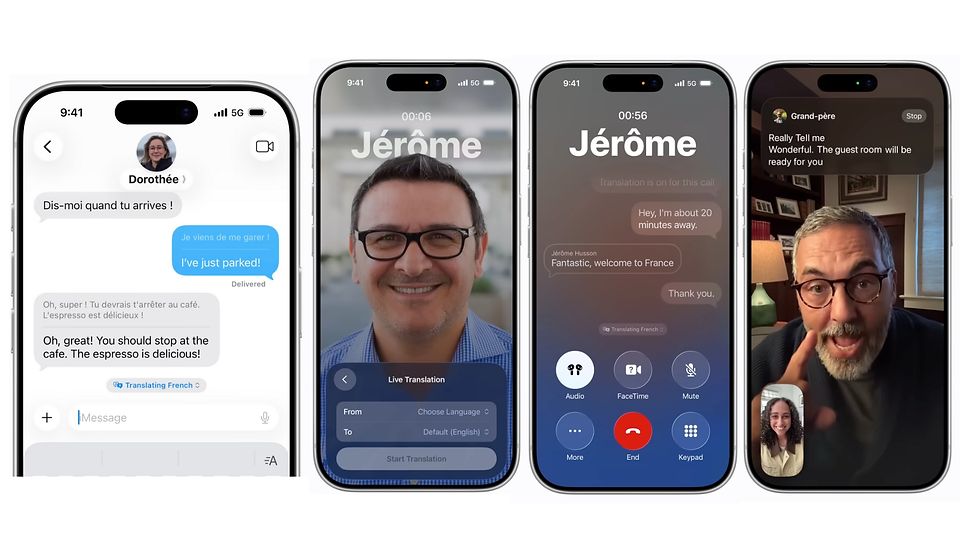
With iOS 26, chatting with people who speak different languages is now effortless. Thanks to Apple’s new Live Translation feature, conversations flow smoothly with instant translations built right into Messages.
Supported Devices
Live Translation uses Apple Intelligence, which means it works only on:
iPhone 15 Pro
iPhone 16
iPhone Air
iPhone 17
Supported Languages
Currently, nine languages are available:
Chinese (Mandarin, Simplified)
French
German
Italian
English
Japanese
Korean
Portuguese (Brazil)
Spanish (Spain)
On your device, messages appear in both the original and translated versions. If the recipient is using iOS 26, iPadOS 26, or macOS Tahoe, they will see everything in their own language.
How to Enable Live Translation
Open a conversation in Messages.
Turn on Live Translation and download the language pack.
Your outgoing messages will appear in both languages.
Incoming messages show the original text with the translation underneath.
Quick Translation Controls
During a conversation, tap the “Translating [language]” tab at the bottom to switch modes:
Both Languages: Shows original and translation.
One Language Only: Hides the translation.
Stop Translation: Temporarily disables the feature.
Compatibility with Older Devices
If the other person is on an older iPhone or Android, you can still translate their incoming messages. However, your translated replies won’t appear on their device.



Comments